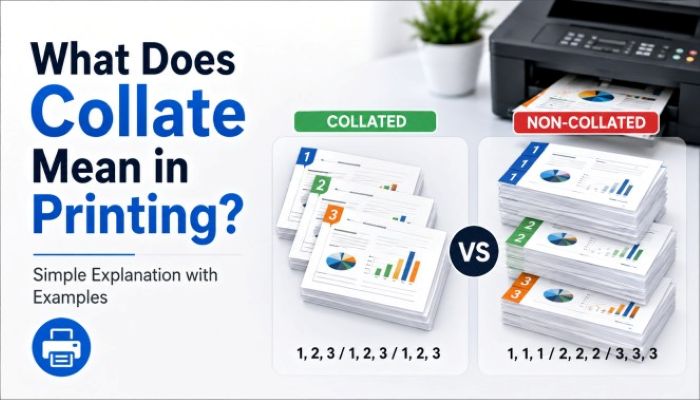
Whenever you print out documents, especially when printing a large number, you will encounter a checkbox labeled “collate.” It seems like an insignificant choice that does not matter much at first glance. However, this is a function that, when used incorrectly, can ruin your entire plan of work and cost you a lot of extra effort to make things right.
Think about having to print out several hundred multi-page documents that end up coming out of the printer all out of order, forcing you to sit there and sort everything manually. It is in situations such as these that the importance of knowing the correct use of collation comes into play.
So, what does collate mean when printing? And why should it be a bigger consideration than most people know? But more importantly, when should you use it, and when shouldn’t you?
In this blog, we will give you an understanding of the definition of collate, the meaning of collate in printing, the differences between collated and uncollated printing, and other useful information.
What Does Collate Mean in Printing?
Essentially, collate meaning refers to the act of arranging papers in a certain logical sequence.
For instance, when it comes to printing, what does collate mean in printing specifically refers to:
Organizing multiple pages into sets according to sequence when more than one copy is printed.
Rather than printing the identical pages in stacks, the printer puts together your documents.
A Simple Way to Understand Collated Meaning
Think of it like assembling exam papers or product manuals.
If you print a 4-page document three times:
- Collated output:
1-2-3-4, 1-2-3-4, 1-2-3-4 - Uncollated output:
1-1-1, 2-2-2, 3-3-3, 4-4-4
That’s the real difference behind what does collated mean, it’s about ready-to-use document sets.
What Is Collate Printing & Why It Exists
What is collate printing? It is an automatic feature intended to minimize manual labor in dealing with multi-page documents.
In times before electronic printers, one had to arrange printed pages manually. Collate printing automated the process.
How important is it today?
- Time saving in office environments and industrial settings
- Error-proof document preparation
- Increases the quality of presentation
- Important for professional presentations to clients
Collated vs Uncollated: Which One Should You Choose?
Understanding the difference between collated and uncollated is crucial for productivity.
Side-by-Side Comparison
| Factor | Collated Printing | Uncollated Printing |
| Output Style | Complete document sets | Page-by-page stacks |
| Manual Work | None | Required |
| Speed | Slightly slower printing | Faster raw output |
| Best Use Case | Reports, guides, presentations | Bulk processing, binding |
| Error Risk | Low | Higher |
That is why collated vs uncollated depends on your choice between automation and manual work.
What Does Collate Mean Printing in Real Workflows?
Now let’s see how this is useful in real-life applications, particularly when it comes to packaging and office tasks.
1. Instruction Manuals or Branding Leaflets
The collating process will make sure that all necessary pages end up in one package.
2. Corporate Reports
Nobody would want to have to assemble 100 reports manually. All you need is a collation process.
3. Educational or Training Material
Workshops need properly sorted papers.
4. Marketing Material
Catalogs, brochures, and other promotional materials should be well-organized and collated correctly.
And this is why the need to know: what does collate mean in printing, is important.
When You Should NOT Use Collation
However, it is worth noting that collated prints don’t necessarily represent higher quality.
Skip collation in the following situations:
- When you intend to later bind pages
- When you utilize automatic finishing machines
- If you require sorting in large volumes according to the types of pages
- When printing for industry-wide purposes
In these cases, uncollated printing can actually be more efficient.
How Collation Impacts Packaging Businesses
Collation also serves an important role for brands, albeit a subtle one.
Here’s why it’s important:
- Provides a consistent brand experience to the customers
- Ensures inserts are properly collated within the box
- Avoids missing pages in manuals
- Facilitates efficient packaging processes
An error, such as not collating the inserts, can make your packaging look unprofessional.
Common Misunderstandings About Collate Printing
Here are some myths that should be dispelled:
- “Collation can only be used in an office setting.”
Not true, it is essential in manufacturing and packaging.
- “Collation does not impact output quality.”
On the contrary, it influences usability and appearance.
- “Uncollation is faster.”
Only until manual sorting comes into play.
Knowing what collation means in printing will help you eliminate such inefficiencies.
Quick Reference Table
| Term | Meaning |
| Collate meaning | Arranging pages in order |
| Collated printing | Complete document sets printed sequentially |
| Uncollated printing | Pages printed in grouped batches |
| What does collate mean in printing | Automatic document organization during printing |
Final Thoughts
Knowing how to collate in printing is not only important in understanding how the setting works; it is a way of increasing efficiency and professionalism.
Depending on whether you are working on office papers or even packaging inserts, opting for collated vs uncollated could significantly affect how everything is done in terms of time and presentation.
In competitive industries such as packaging, where small differences matter, it is vital to ensure that there are no issues with the printing and packaging process. This means that the material should be well-printed, well-collated, and well-branded, especially when it comes to things such as insert instructions. This is one of the things that make Packaging Heights unique in its print and packaging services.
FAQs
What does collate mean in printing several copies of one document?
The word “collate” implies creating complete sets of printed copies in proper order for ease of use.
How can I tell the difference between collated and uncollated?
Collation in printing creates complete sets of documents, whereas uncollation prints identical pages separately. The difference is whether the printed pages will be sorted or printed out sequentially.
What does collated mean in printer settings?
Collated means that the document is automatically sorted into complete sets when printing many copies. It makes sure that your document will be created correctly.
When should I enable collate mode?
Enable the mode when printing a report or presentation containing a large number of pages that will be used as whole documents.
What is meant by ‘collate’ in PDF printing?
It implies that the pages will be printed in correct order in all copies of the file being printed. This feature is identical to what happens in conventional printing of any document.
Does collating need to be selected in case of one-page documents?
Not at all, since there will be only one page per document copy.






 Company
 Top products
 Help
Help
 Payment Method